How to Install KEMO SAT on Formuler Box | Complete Setup Guide
Introduction
Welcome to the complete guide on how to install KEMO SAT on a Formuler Box. If you own a Formuler device (such as the Z8, Z10, Z11 Pro, or Z11 Pro Max), you already know it is one of the most premium Android-based IPTV boxes on the market.
The biggest advantage of a Formuler box is its exclusive, built-in application: MYTVOnline (often abbreviated as MOL2 or MOL3, depending on your device generation). This powerful software is engineered specifically to handle live TV, VOD, and EPG data flawlessly, giving you a top-tier, cable-like experience without needing to download third-party apps like IPTV Smarters or VLC.
Formuler’s MYTVOnline is compatible with multiple portal types, including MAC-ID (Stalker Middleware), XC (Xtream Codes API), and M3U playlists. In this guide, we will cover the two best methods for connecting your KEMO SAT 4K subscription: the Xtream Codes API (XC) method and the MAC-ID (Stalker) method.
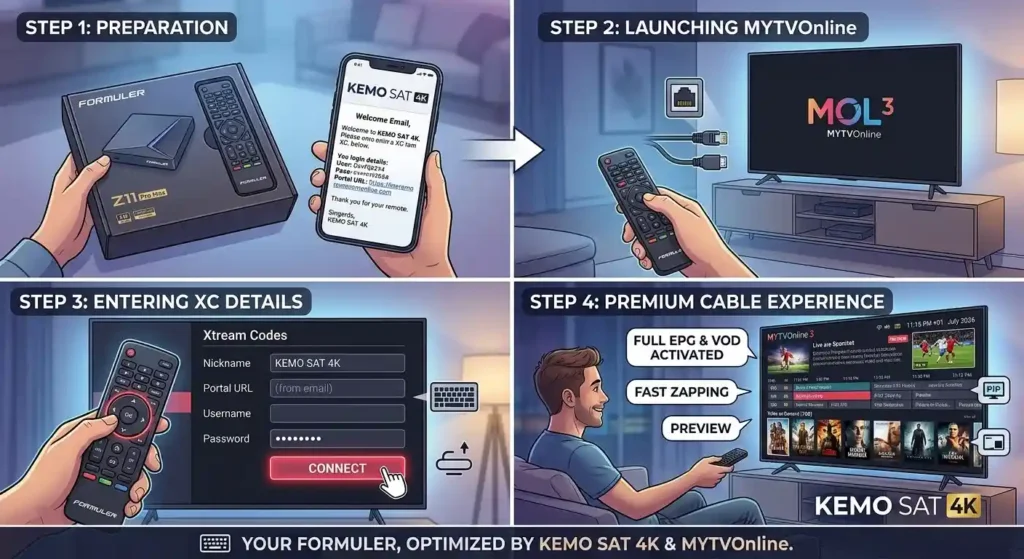
Table of Contents
Before You Begin: Getting Your Details Ready
To set up KEMO SAT seamlessly, you first need to locate the correct settings menu based on your version of MYTVOnline:
- MYTVOnline 2 (MOL2): Go to
Menu > Connections. - MYTVOnline 3 (MOL3): Go to
Menu > Content Manager > Content Sources.
Make sure you have your KEMO SAT welcome email open. Depending on the method you choose below, you will need either your Xtream Codes details (Username, Password, and Portal URL) or your Portal URL combined with your device’s unique MAC ID.
Method 1: Connecting via Xtream Codes API (Recommended)
Using the Xtream Codes (XC) API is generally the preferred method because it does not lock your subscription to the device’s physical MAC address, and it loads channels and VODs incredibly fast.
Step-by-Step Instructions:
- Open MYTVOnline: Launch the MYTVOnline 2 or MYTVOnline 3 app from your Formuler home screen.
- Access Connections: Navigate to
Connections(MOL2) orContent Sources(MOL3). - Add Portal: Click on Add Portal or Add XC Portal.
- Enter Server Details: Fill in the provided fields with your KEMO SAT subscription info:
- Portal Nickname: Type “KEMO SAT” (or any name you prefer).
- Portal URL: Carefully enter the exact Portal URL provided in your email.
- Login Required? Check or toggle this box so the username and password fields appear.
- User ID: Enter your KEMO SAT username.
- User Password: Enter your KEMO SAT password.
- Connect: Click Connect or Save.
- Wait for Loading: The app will connect to the server and begin downloading the Live TV channels, VOD library, and TV Guide (EPG). Once finished, you are ready to stream!
Method 2: Connecting via MAC-ID (Stalker Portal)
If you specified your Formuler’s MAC address when purchasing your KEMO SAT subscription, you must use this Stalker Middleware method.
Step-by-Step Instructions:
- Find Your MAC ID: Locate the MAC address starting with
00:1A...on the sticker on the bottom of your Formuler box, or on the Portal connection screen. Ensure KEMO SAT support has this exact MAC address activated on their end. - Open MYTVOnline: Launch the app and go to the
ConnectionsorContent Sourcesmenu. - Add Portal: Click on Add Portal or Add MAC Portal.
- Enter Portal Details:
- Portal Nickname: Type “KEMO SAT 4K”.
- Portal URL: Enter the Stalker Portal URL provided by KEMO SAT.
- (Leave the login toggle unchecked, as MAC-ID does not require a username/password).
- Connect: Click Connect. The Formuler box will authenticate your device’s MAC address with the KEMO SAT servers and load your playlist.
Troubleshooting Formuler Connectivity Issues
Formuler devices are robust, but if you run into an error, check these common fixes:
- “Portal URL is Invalid” or “Check Internet Connection”: Double-check that you typed the URL perfectly. Pay close attention to
http://vshttps://and ensure there are no blank spaces at the end. - “Authentication Failed” (MAC Method): This means your Formuler is communicating with the server, but the server doesn’t recognize your device. Contact KEMO SAT support and verify they have the correct MAC ID starting with
00:1A.... - EPG (TV Guide) is Empty: From the live TV view, press the
Menubutton on your remote, go toSettings, and look for the option toRefresh EPGorUpdate Portal.
Frequently Asked Questions (FAQ)
Is MYTVOnline 3 better than MYTVOnline 2? Yes, MYTVOnline 3 (found on newer devices like the Z11 series) offers an updated, modernized interface, universal search across multiple portals, and better picture-in-picture capabilities. However, both versions handle KEMO SAT flawlessly.
Can I use a VPN with my Formuler Box? Absolutely. Since Formuler devices run on an Android operating system, you can easily open the Google Play Store on the device, download your preferred VPN app, and connect it before opening MYTVOnline.
How do I update MYTVOnline? Formuler usually pushes updates automatically. However, you can manually check for software updates by going to the main Android home screen, opening the “Software Update” app, and clicking check.
Want to set up KEMO SAT or LEMO TV on a different television or device? Check out our other installation guides for Android Smart TV, Windows PC, and MAG Box!